---
title: Postgres extension updates, NAT gateway IPs, and more
---
## Postgres extension updates
We've expanded extension support for Postgres 18.
**Now available on Postgres 18:**
| Extension | Version |
| :---------- | :------ |
| TimescaleDB | 2.24.0 |
| pgx_ulid | 0.2.2 |
For a complete list of Postgres extensions supported by Neon, see [Postgres extensions](/docs/extensions/pg-extensions).
## New NAT gateway IP addresses
We've added new NAT gateway IP addresses in three AWS regions to expand infrastructure capacity. If you have external [IP allowlists](/docs/manage/projects#configure-ip-allow) that enable connections from external services into Neon, **update those allowlists soon to include the new addresses** to avoid connectivity issues.
See our [Regions documentation](/docs/introduction/regions#aws-nat-gateway-ip-addresses) for the complete list of NAT gateway IPs for all regions.
## New VPC endpoint services for Private Networking
We've added new VPC endpoint service addresses for Private Networking in the AWS US East (N. Virginia), US East (Ohio), and US West (Oregon) regions. If you're setting up Private Networking in these regions, you can now use the additional endpoint service addresses for enhanced infrastructure capacity and reliability.
For the complete list of VPC endpoint service addresses by region, see our [Private Networking guide](/docs/guides/neon-private-networking).
## Neon Auth SDK simplified
We've released a major update to the server-side Neon Auth SDK (`@neondatabase/auth/next/server`) for Next.js applications.
**Unified entry point**
The SDK now uses a single `createNeonAuth()` function that replaces the previous separate functions (`neonAuth()`, `authApiHandler()`, `neonAuthMiddleware()`, `createAuthServer()`). Configure authentication once and access all functionality from a single object:
```typescript
// lib/auth/server.ts
import { createNeonAuth } from '@neondatabase/auth/next/server';
export const auth = createNeonAuth({
baseUrl: process.env.NEON_AUTH_BASE_URL!,
cookies: { secret: process.env.NEON_AUTH_COOKIE_SECRET! },
});
// Use everywhere in your app
export const { GET, POST } = auth.handler(); // API routes
export default auth.middleware({ loginUrl: '...' }); // Middleware
const { data: session } = await auth.getSession(); // Server components
await auth.signIn.email({ email, password }); // Server actions
```
**Explicit configuration**
Configuration is now explicit rather than implicit. You must pass `baseUrl` and `cookies.secret` directly to `createNeonAuth()` instead of relying on automatic environment variable reading, making dependencies clear and eliminating "magic" behavior.
**Session caching**
Session data is now automatically cached in a signed cookie, reducing API calls to the Auth Server by 95-99%. Sessions are cached for 5 minutes by default (configurable) and automatically refresh as needed.
**Breaking changes**
This release includes breaking changes. Key changes include replacing separate auth functions with the unified `createNeonAuth()` API, adding a required `NEON_AUTH_COOKIE_SECRET` environment variable, and adding `dynamic = 'force-dynamic'` to server components that use auth methods.
For detailed migration instructions, see the [migration guide](/docs/auth/migrate/from-auth-v0.1). For complete API documentation, see the [Next.js Server SDK reference](/docs/auth/reference/nextjs-server).
**Getting started**
To see the latest SDK in action, check out the demo applications in the [Neon JavaScript SDK repository](https://github.com/neondatabase/neon-js), including a Next.js demo with server components, a React + Vite demo with external UI, and a React demo with the full `neon-js` SDK. The repository also includes AI coding assistant skills (for Cursor and Claude Code) with updated setup guides and code examples. See the [Neon Auth quickstart guide](/docs/auth/quick-start/nextjs) and [Server SDK reference](/docs/auth/reference/nextjs-server) to get started.
_Neon Auth is a managed authentication service that branches with your database. See the [Neon Auth overview](/docs/auth/overview) to learn more._
## Instagres adds REST API
Instagres now offers a REST API for programmatic database provisioning. [Instagres](/docs/reference/instagres) is a service that gives you an instant PostgreSQL database with zero configuration. No account required.
The new API enables you to create databases with a single HTTP request:
```bash
curl -X POST https://instagres.com/api/v1/database \
-H 'Content-Type: application/json' \
-d '{"ref": "your-app-name"}'
```
The API returns a connection string, claim URL, and expiration timestamp. You can also retrieve database details using `GET /api/v1/database/:id`. This makes Instagres easier to integrate into CI/CD pipelines, testing frameworks, and automation workflows. See the [Instagres API reference](/docs/reference/instagres#api) for complete documentation.
**Data anonymization**
- You can now anonymize columns that are part of primary keys when creating [anonymized branches](/docs/workflows/data-anonymization). Neon automatically handles foreign key constraints during the anonymization process, ensuring referential integrity is maintained across related tables.
**Neon CLI**
- Added project recovery commands to the Neon CLI. You can now list deleted projects within their recovery grace period and recover them. This provides CLI access to the [project recovery feature](/docs/manage/projects#recover-a-deleted-project) that was previously only available through the Console and API.
```bash
neonctl projects list --recoverable-only
neonctl projects recover
```
- The `neon init` command now requires authentication before running. If you're not already authenticated, the CLI will automatically open your browser to log in. Additionally, `neon init` now installs Cursor skills from the [Neon skills repository](https://github.com/neondatabase-labs/ai-skills) instead of rules, providing more flexible and powerful AI agent capabilities for database development workflows.
To access these new features, upgrade to the latest version of the Neon CLI (version 2.20.2). For upgrade instructions, see [Neon CLI upgrade](/docs/reference/cli-install#upgrade).
**Neon MCP Server**
- The `provision_neon_auth` tool in the [Neon MCP Server](/docs/ai/ai-mcp-neon) is now idempotent and returns your Neon Auth configuration details (base URL and JWKS URL) even when Neon Auth is already provisioned. This makes it easier to retrieve your authentication configuration without needing to make separate API calls.
**Neon Skills**
- You can now install Neon agent skills as a Claude Code plugin, which bundles both the skills and the Neon MCP Server for natural language database management. See [Neon Agent Skills](https://github.com/neondatabase/agent-skills).
```bash
/plugin marketplace add neondatabase/agent-skills
/plugin install using-neon@neon-agent-skills
```
_Agent Skills are resources that AI agents can discover and reference to help you work more accurately and efficiently with Neon_.
**Neon VS Code Extension**
- The [Neon VS Code Extension](/docs/guides/neon-vscode) now automatically focuses on the Databases view after connecting to a branch, making it easier to immediately see your database schema and objects. The extension also includes performance improvements with smart caching and background data refresh for faster load times. Upgrade to the latest version to access these improvements.
**OpenTelemetry integration**
- The [OpenTelemetry monitoring integration](/docs/guides/opentelemetry) now supports gRPC protocol endpoints in addition to HTTP/HTTPS. When configuring an OpenTelemetry integration, you can use gRPC OTLP endpoints, and Neon will validate your credentials before saving the configuration.
**SQL Editor**
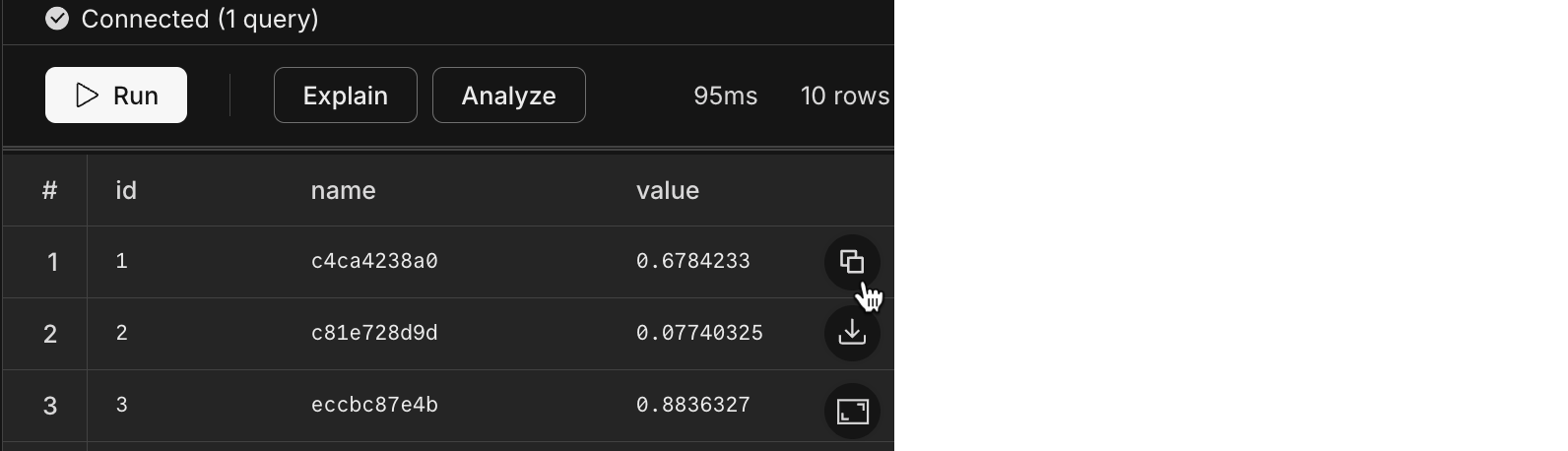
- Added a copy button to the [SQL Editor](/docs/get-started-with-neon/query-with-neon-sql-editor) that lets you copy query results as JSON directly to your clipboard without downloading a file. The copy button appears alongside the download button in the query results view.
**Fixes**
- Fixed an issue in the Neon consumption history API endpoint that caused errors when retrieving project consumption data.
- Fixed an issue where deleting a Postgres role would fail if the role had been granted specific privileges (such as SELECT or INSERT) by another role. Role deletion now properly revokes all individual privileges before removing the role, ensuring successful deletion in all scenarios.